
Measuring website effectiveness

Tools to measure and analyse website traffic
Any professional online marketing project relies on analytical tools to help measure effectiveness. The output of these tools can then be used to tune the inputs to the overall process to optimise and enhance. Marketing processes need to be targeted, ROI based and carefully evaluated – if not you will be wasting some, if not most of your cash.
The hub of any online marketing process is the website. It is particularly important to measure and analyse traffic to the site i.e. the quantity, quality, sources and ultimately, if it resulted in new business, or in web parlance, conversion.
Even if you employ a marketing company to look after all of this, you should have access to suitable tools to ensure that you, the website owner, have a good overview of how the marketing is working. Don’t simply rely on a monthly report from your marketer as these can be easily configured to show you only the data that the marketer wants you to see i.e. just the good bits.
Having access to your own analytics systems means that you can, with relatively little experience, keep a high level eye on things. At Dental Media we encourage all of our clients to use the same tools that we use, for example Google Analytics and Webmaster Tools.
So what free tools are available to webmasters to monitor site performance?
Let’s start with the basics. All websites require hosting i.e. the server where the web files are stored and served to visitors via the world wide web. Most hosts will provide a fully-featured control panel with a suite of useful tools, for example to set up new email accounts, web mail services and web traffic analysis.
Our hosting provides two such tools – Webalizer and Awstats – both of these are server log analysis tools that measure the traffic to your website and then display it in tabular and graphical format.
It is very easy to use these tools to see the overall traffic to you website, where it came from and which keywords generated it. You can also see the traffic trends, which is a very quick and easy way to see if the marketing campaign is generating new traffic.
So those are the basic tools which any good host should provide as standard. But what if we want to get a little bit more sophisticated?
Introducing Google Analytics and Webmaster Tools
These tools are free to use for anyone with a Google account. Between them they provide a significant proportion of the data a professional web marketer needs and everything a day-to-day webmaster would ever want. Similarly to the hosting tools mentioned above, we also provide these tools for all of our clients.
Google Analytics:
This is a remarkable free tool that shows all kinds of web traffic information, from the basic number of visits right down to granular data like the number of visits from specific types of mobile devices. 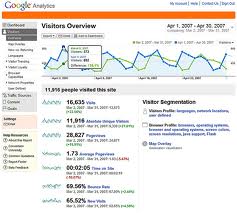
You can compare the traffic from pay-per-click campaigns with that from pure organic traffic, see which websites and keywords generated traffic, view traffic trends, bounce rate and much more. The data is presented in tabular and intuitive graphical formats. You can even configure your own reports and have them mailed to you on a scheduled basis.
One of the key features of the tool is the ability to measure conversions. For a typical dental website, this will be an enquiry form completion and/or a telephone call if you are also running ‘phone call analytics. Conversion measurement is extremely important as it allows you to see which types of traffic are generating enquiries and which aren’t.
One area which warrants particularly close inspection is where you are paying for traffic, for example using Google Adwords. If you take a look at the paid conversions versus those from organic (free) traffic, you may get quite a surprise and not necessarily a pleasant one at that. Unless your PPC campaigns have been carefully targeted and professionally configured, chances are you will see some poor conversion results, which of course means wasted cash. The conversion tools in Analytics give complete transparency and makes this type of evaluation quite straightforward.
Google Webmaster Tools (GWMT):
 GWMT is another “must have” free tool for website owners. Similarly to the other tools, all of our dental marketing clients are equipped with GWMT as standard.
GWMT offers a host of features albeit quite different to the Analytics package.
Although there is plenty of good data covering search impressions and clicks, perhaps the more useful components within GWMT are those which show how your website is performing technically, for example, are your page titles optimised, can Google access all of your pages easily, is your site-map configured properly etc? All of this is critical when optimising a website to ensure that it functions not just well, but excellently.
Another useful section within GWMT is the one that shows links back to your site – this is very useful to see who is linking to you and if the link is useful or potentially harmful. If your dental marketing partner has been building poor links to your site, Google may well have penalised you and dropped you way out of the prominent ranking positions. In this case, you could see a message in GWMT advising about the penalty – a bad situation! If you see this, please contact us to discuss what needs to be done to recover.
Summary
A key feature of professional dental marketing is transparency. At Dental Media we provide our clients with full access to several key measurement tools so that they can see, at a glance, how our campaigns are progressing. If your marketing team is just sending you a simple monthly report and does not provide access to the tools noted above, we’d recommend you ask them to do so – after all it’s your website and your statistics. If you need more advice, why not give the Dental Media team a call on 01332 672548.